Okaybird Safety Alerts: text message program
Okaybird is a personal safety check-in app made by Edmond Davis. If an Okaybird user turns on optional automatic alerts, Okaybird texts that user's emergency contacts when they tap SOS or miss a check-in. This page explains who gets those texts and how to control them.
Who receives texts
Only people an Okaybird user added as an emergency contact (up to 3 per user) and who replied YES to Okaybird's invite. Okaybird never sends marketing or promotional texts, and never texts numbers bought, rented or collected from anywhere else.
How consent works
- In Okaybird, the user turns on automatic alerts, agrees to how they work, enters their first name and adds a contact's phone number. The app tells them the contact will get one text asking them to reply YES, that message and data rates may apply, and links to this page and the privacy policy.
- The contact gets one invite from the Okaybird toll-free number (it sends the invite). It says who added them and what they'll receive.
- The contact replies YES to agree, or STOP to opt out. Until they reply YES, Okaybird does not text them automatically: the user's alerts reach them only as an ordinary text the user sends from their own phone.
- Okaybird confirms the YES with one text. In the app, each contact shows as Pending, Confirmed or Opted out. The user can resend an unanswered invite at most once an hour and 3 times in total; an invite with no reply expires after 30 days.
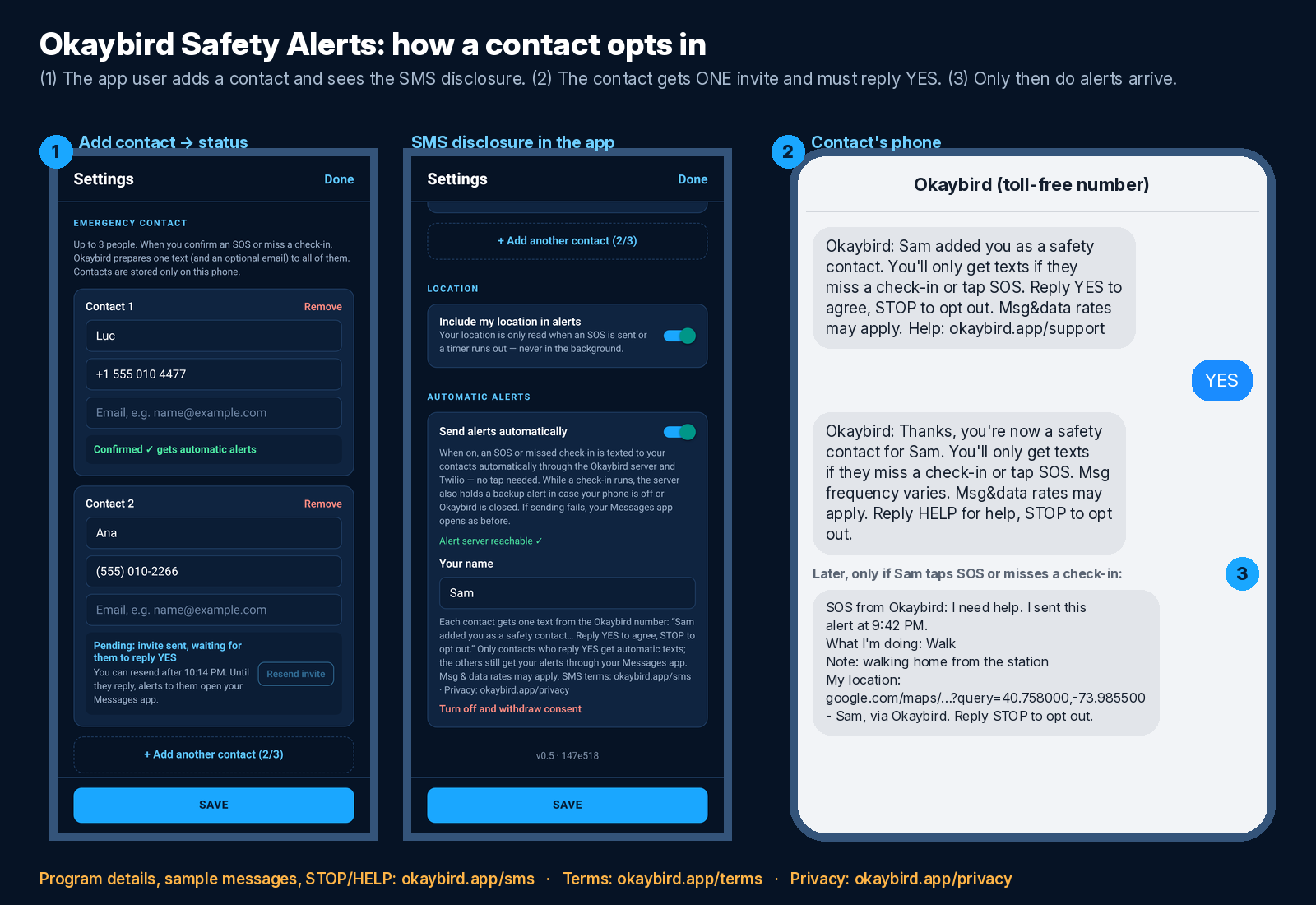
The messages
Invite (one time, when you're added):
Okaybird: Sam added you as a safety contact. You'll only get texts if they miss a check-in or tap SOS. Reply YES to agree, STOP to opt out. Msg&data rates may apply. Help: okaybird.app/support
Confirmation (after you reply YES):
Okaybird: Thanks, you're now a safety contact for Sam. You'll only get texts if they miss a check-in or tap SOS. Msg frequency varies. Msg&data rates may apply. Reply HELP for help, STOP to opt out.
SOS alert (when the person who added you taps SOS):
SOS from Okaybird: I need help. I sent this alert at 9:42 PM.
What I'm doing: Walk
Note: walking home from the station
My location: https://www.google.com/maps/search/?api=1&query=40.758000,-73.985500
- Sam, via Okaybird. Reply STOP to opt out.
Missed check-in alert (when their timer runs out and they haven't checked in):
Okaybird alert: my safety check-in timer ended at 11:30 PM and I haven't checked in. Please try to reach me.
What I'm doing: Date
Note: dinner at Luigi's on 5th St
Sent automatically because my phone didn't check in, so my current location isn't included.
- Sam, via Okaybird. Reply STOP to opt out.
Reply to HELP:
Okaybird Safety Alerts: texts only when someone who added you misses a check-in or taps SOS. Not an emergency service; if someone is in danger call 911. Help: okaybird.app/support or support@okaybird.app. Reply STOP to opt out.
Reply to STOP:
Okaybird: You're unsubscribed and won't get any more texts from this number. Reply START to opt back in.
How often
Message frequency varies. You get one invite and one confirmation, then texts only when the person who added you taps SOS or misses a check-in, which for most people is rarely or never. Okaybird limits each user to 5 alerts an hour.
STOP, START and HELP
- Reply STOP (or STOPALL, UNSUBSCRIBE, CANCEL, END, QUIT) at any time to stop all texts from Okaybird. You'll get one message confirming it, then nothing more.
- Reply START to opt back in.
- Reply HELP for help, or email support@okaybird.app.
Costs and carriers
Message and data rates may apply. Okaybird doesn't charge contacts anything. Carriers are not liable for delayed or undelivered messages.
Not an emergency service
Okaybird does not contact 911 or any emergency service, and a text can be delayed or fail. If you get an alert and think someone is in danger, call 911 or your local emergency number.
Privacy
Your phone number and your YES or STOP reply are used only to deliver these safety texts. We do not sell, rent or share mobile phone numbers or SMS opt-in data and consent with third parties for marketing or promotional purposes. Read the privacy policy and the terms of use. Questions: support or support@okaybird.app.